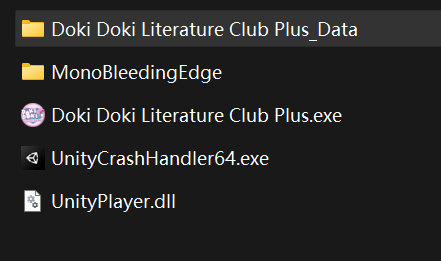
只有UnityPlayer.dll和启动器,典型的momo打包,直接分析data/managed/Assembly-CSharp.dll
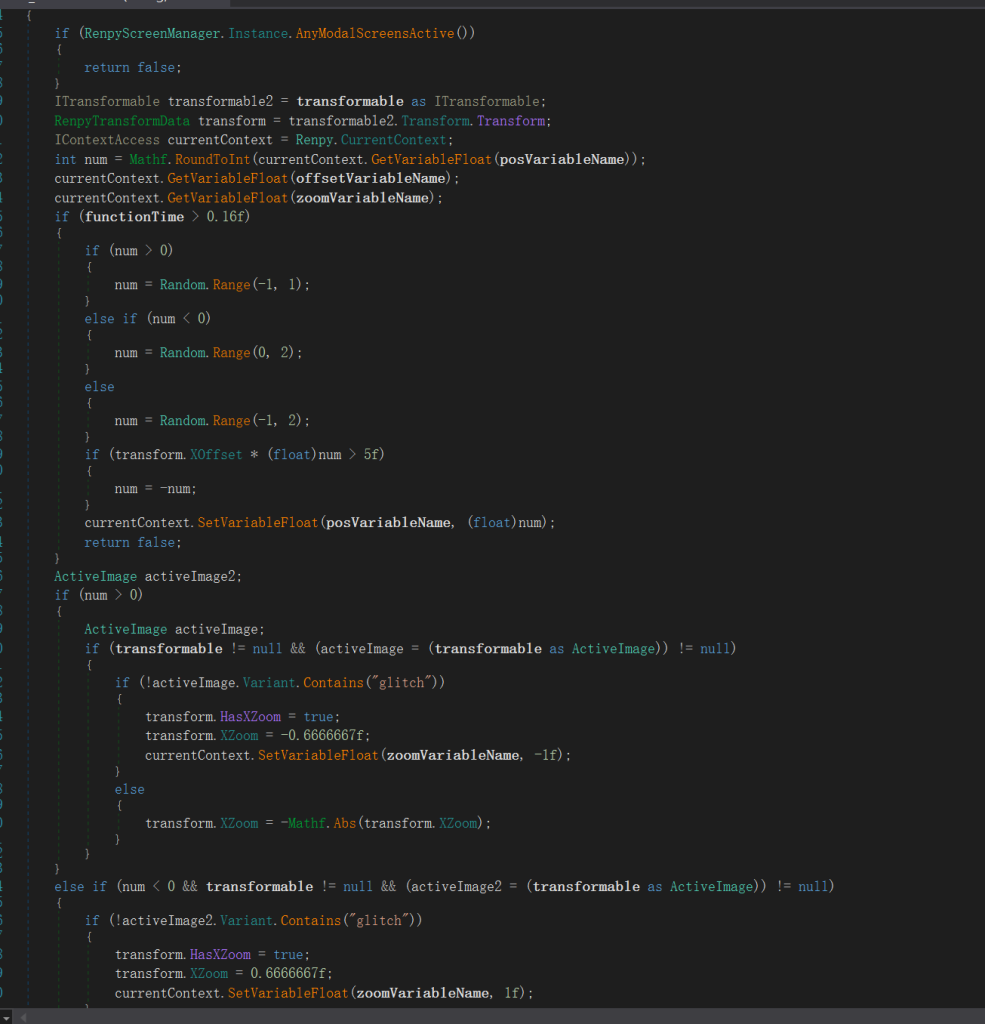
这就是恐怖效果的代码,并且大家都调用的这一个逻辑,可造成画面偏移、拉伸、抖动,使角色发生偏移。
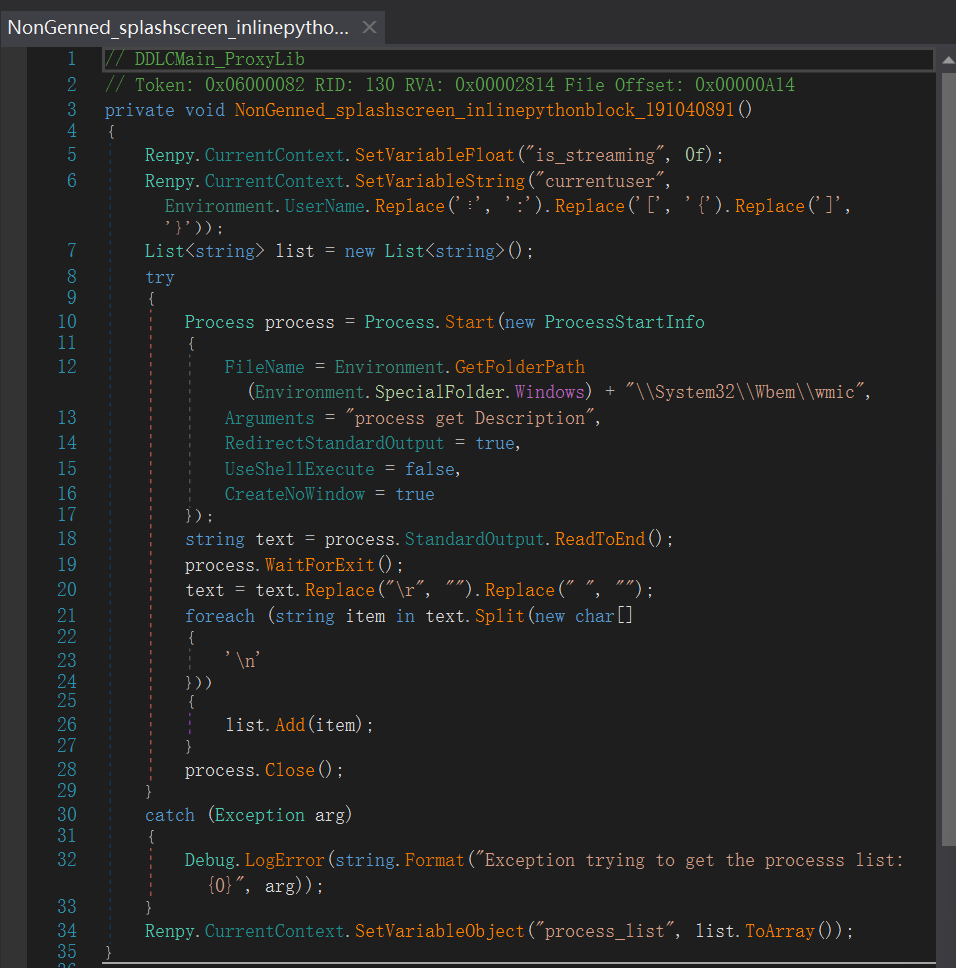
这就是最让这个游戏具有真实感/突破次元壁的数据,老莫会和你聊天的时候说出“其实你是叫xxx”“你的后台还挂着xxx”这类话语,就是这也代码的功劳,当然更出名一点的meta游戏君彼女应该也是有类似于这样的脚本的。
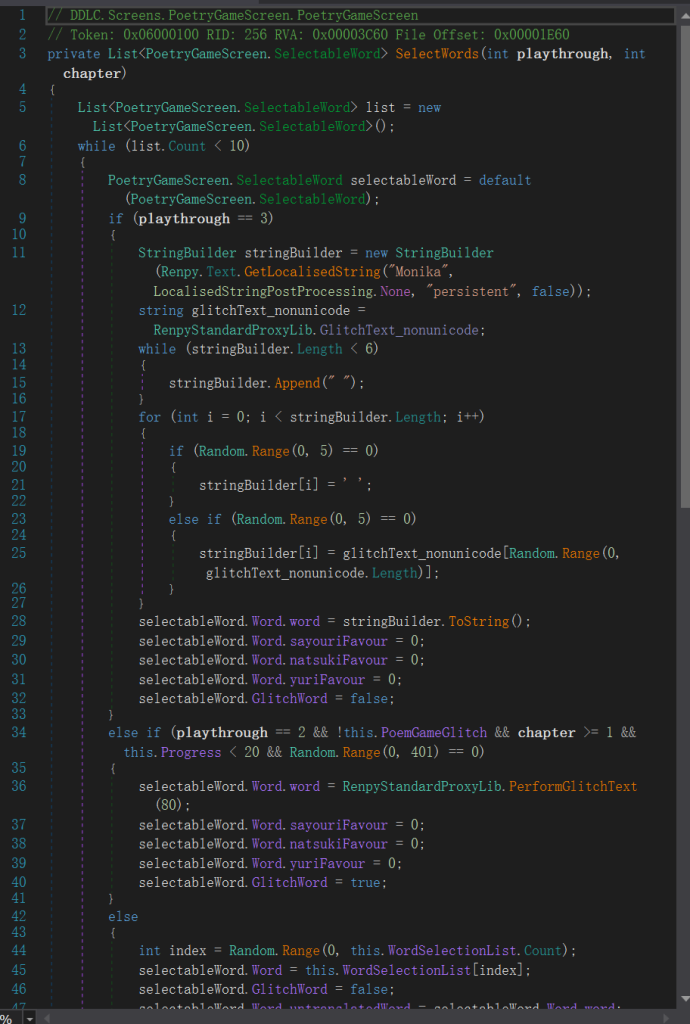
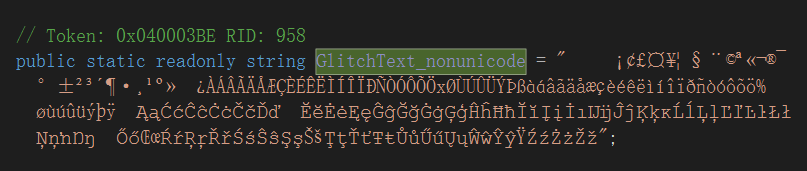
这就是这个游戏精彩所在了,选词写诗,其定义了,第一轮不会出现诡异画面,选了什么词,谁的好感度+3(并非经验),第二轮有四百零一分之一的概率出现诡异画面和“glitchtext”,而第三轮会出现诡异画面,当二十个词语全部选择正确会获得完美诗歌成就,并且还会有个很隐藏的羊叫音效,也是概率极低
没写完……这个诗歌游戏都花了好久去看,另外也看了关于整个游戏的页面渲染,存档,文本等一些基本的,等我解包过后继续,或者也不用解包,
ok将其导出,基本都是c#编写的.cs文件,我们就分析其中的一些文件吧(我感兴趣的)
[Serializable]
	public class Blood : Line, IDisplayable, ITransform, IApply, IPostRenderable
	{
		// Token: 0x060010D5 RID: 4309 RVA: 0x00044398 File Offset: 0x00042598
		private void AddSquirt()
		{
			float f = Random.Range(0f, 1f) * 6.283f;
			RenpyStandardProxyLib.Blood.SquirtParticle item;
			item.alive = true;
			item.xspeed = (float)this.m_SquirtPower * Mathf.Cos(f);
			item.yspeed = (float)this.m_SquirtPower * Mathf.Sin(f);
			this.m_Squirts.Add(item);
		}

		// Token: 0x060010D6 RID: 4310 RVA: 0x000443FC File Offset: 0x000425FC
		private void AddBurst(float startTime)
		{
			RenpyStandardProxyLib.Blood.DropParticle dropParticle;
			dropParticle.alive = true;
			dropParticle.xspeed = (Random.Range(0f, 1f) - 0.5f) * this.m_BurstSpeedX + 20f;
			dropParticle.yspeed = (Random.Range(0f, 1f) - 0.75f) * this.m_BurstSpeedY + 20f;
			dropParticle.time = this.m_ParticleTime;
			dropParticle.startTime = startTime;
			dropParticle.x = 0f;
			dropParticle.y = 0f;
			dropParticle.zoomstart = 0.75f;
			dropParticle.zoomend = 0f;
			dropParticle.zoomtime = Random.Range(0.25f, 0.55f);
			dropParticle.zoom = dropParticle.zoomstart;
			this.m_Drops.Add(dropParticle);
		}

		// Token: 0x060010D7 RID: 4311 RVA: 0x000444D8 File Offset: 0x000426D8
		private void AddDrip(float startTime)
		{
			RenpyStandardProxyLib.Blood.DropParticle dropParticle;
			dropParticle.alive = true;
			dropParticle.xspeed = (Random.Range(0f, 1f) - 0.5f) * this.m_DripSpeedX + 20f;
			dropParticle.yspeed = Random.Range(0.1f, 1f) * this.m_DripSpeedY + 20f;
			dropParticle.time = this.m_ParticleTime;
			dropParticle.startTime = startTime;
			dropParticle.x = 0f;
			dropParticle.y = 0f;
			dropParticle.zoomstart = 0.75f;
			dropParticle.zoomend = 0f;
			dropParticle.zoomtime = Random.Range(0.25f, 0.55f);
			dropParticle.zoom = dropParticle.zoomstart;
			this.m_Drops.Add(dropParticle);
			this.dripCount++;
		}

		// Token: 0x060010D8 RID: 4312 RVA: 0x000445BC File Offset: 0x000427BC
		private void AddSquirtDrip(RenpyStandardProxyLib.Blood.SquirtParticle s, float startTime)
		{
			RenpyStandardProxyLib.Blood.DropParticle dropParticle;
			dropParticle.alive = true;
			dropParticle.xspeed = s.xspeed + (Random.Range(0f, 1f) - 0.5f) * 20f;
			dropParticle.yspeed = s.yspeed + (Random.Range(0f, 1f) - 0.5f) * 20f;
			dropParticle.time = this.m_ParticleTime;
			dropParticle.startTime = startTime;
			dropParticle.x = (Random.Range(0f, 1f) - 0.5f) * 5f;
			dropParticle.y = (Random.Range(0f, 1f) - 0.5f) * 5f;
			dropParticle.zoomstart = 0.75f;
			dropParticle.zoomend = 0f;
			dropParticle.zoomtime = Random.Range(0.25f, 0.55f);
			dropParticle.zoom = dropParticle.zoomstart;
			this.m_Drops.Add(dropParticle);
		}

		// Token: 0x060010D9 RID: 4313 RVA: 0x00005AE8 File Offset: 0x00003CE8
		public void Apply(IContext context)
		{
		}

		// Token: 0x060010DA RID: 4314 RVA: 0x000446C4 File Offset: 0x000428C4
		public bool Immediate(GameObject gameObject, CurrentTransform currentTransform)
		{
			this.m_TotalEffectTime = 0f;
			this.m_Squirts = new List<RenpyStandardProxyLib.Blood.SquirtParticle>(this.m_NumSquirts);
			for (int i = 0; i < this.m_NumSquirts; i++)
			{
				this.AddSquirt();
			}
			this.m_Drops = new List<RenpyStandardProxyLib.Blood.DropParticle>(this.m_BurstSize);
			for (int j = 0; j < this.m_BurstSize; j++)
			{
				this.AddBurst(0f);
			}
			return true;
		}
这是RenpyStandardProxyLib.cs里生成血滴的逻辑,有喷射粒子(squirparticle)和滴落粒子(dropparticle)两种,基于滴落血滴生成爆发型血滴,基于喷射粒子生成喷射分裂血滴。重点看看爆发型血滴:y轴上的速度随即范围更负,即血滴向下运动,贴合现实,缩放逐渐变为0,即血滴消失。yuri自杀靠的就是这个逻辑喵~
if (Renpy.Input.CurrentInputModality == RenpyInputModality.Controller || Renpy.Input.CurrentInputModality == RenpyInputModality.Keyboard)
			{
				if (EventSystem.current.currentSelectedGameObject == null || !EventSystem.current.currentSelectedGameObject.activeInHierarchy)
				{
					Selectable selectable = null;
					RenpyScreenBehaviour renpyScreenBehaviour2 = null;
					int num = int.MinValue;
					foreach (RenpyScreenID key in this.activeScreens)
					{
						RenpyScreenBehaviour renpyScreenBehaviour3 = this.screenLookUpTable[key];
						Selectable defaultSelectable = renpyScreenBehaviour3.GetDefaultSelectable();
						if (defaultSelectable && defaultSelectable.gameObject.activeInHierarchy && defaultSelectable.interactable && renpyScreenBehaviour3.MenuFocusPriority >= num)
						{
							renpyScreenBehaviour2 = renpyScreenBehaviour3;
							selectable = defaultSelectable;
							num = renpyScreenBehaviour3.MenuFocusPriority;
						}
					}
					if (selectable != null)
					{
						if (renpyScreenBehaviour2 != null)
						{
							renpyScreenBehaviour2.UnfocusSelectables();
						}
						RenpyButtonUI component = selectable.GetComponent<RenpyButtonUI>();
						if (component != null)
						{
							component.muteNextSelectedSound = true;
						}
					}
					EventSystem.current.SetSelectedGameObject((selectable != null) ? selectable.gameObject : null);
这是RenpyScreenManager里最核心的键盘鼠标手柄输入适配逻辑,主要是确保玩家玩的时候总有一个交互的UI(UI 是 User Interface 的缩写,中文叫用户页面),设计了优先级机制MenuFocusPriority,值越高越优先,所以当弹窗打开时玩家就只能在弹窗上操作,另外设置了component.muteNextSelectedSound = true,即静音下一次选中音效,可以避免声音刷屏,只有玩家主动交互时才响。
// Token: 0x060004F8 RID: 1272 RVA: 0x00016E14 File Offset: 0x00015014
	public string GetFileName(string poemName, string languageTag, PoemCreationApp.OutputImageData imageData)
	{
		if (imageData.filePostfix == null || string.IsNullOrEmpty(imageData.filePostfix) || string.IsNullOrWhiteSpace(imageData.filePostfix))
		{
			return poemName + "_" + languageTag + ".png";
		}
		return string.Concat(new string[]
		{
			poemName,
			"_",
			imageData.filePostfix,
			"_",
			languageTag,
			".png"
		});
	}

	private string GetFullFileName(string poemName, string languageTag, PoemCreationApp.OutputImageData imageData)
	{
		return this.GetScreenshotDirectory() + this.GetFileName(poemName, languageTag, imageData);
	}

	// Token: 0x06000501 RID: 1281 RVA: 0x00017048 File Offset: 0x00015248
	private string GetScreenshotDirectory()
	{
		char directorySeparatorChar = Path.DirectorySeparatorChar;
		return string.Format("{0}{1}LauncherAssets{2}GalleryImages{3}GeneratedPoems{4}", new object[]
		{
			Application.dataPath,
			directorySeparatorChar,
			directorySeparatorChar,
			directorySeparatorChar,
			directorySeparatorChar
		});
	}

	// Token: 0x06000502 RID: 1282 RVA: 0x00017097 File Offset: 0x00015297
	private Lines GetLines(string languageCode)
	{
		return ActiveAssetBundles.PerformLoadBundle("lang" + languageCode).LoadAsset<Lines>("Assets/DDLC/ScriptableObjects/Lines_" + languageCode + ".asset");
}这是PoemCreationApp里负责生成诗歌截图和输出文件的关键代码,截图格式是诗歌名_后缀_语言.png,并生成跨平台的截图存储路径(通过获取当前系统的目录分隔符实现,win是\,mac和Linux是/,生成结果长这样Assets\LauncherAssets\GalleryImages\GeneratedPoems\,而最后的getline就是从Ren’Py 的资源包中加载指定语言的文本配置文件然后返回实例,后续通过该实例获取具体的诗歌
// Token: 0x060001B9 RID: 441 RVA: 0x00007658 File Offset: 0x00005858
	public override void prepareForUse()
	{
		this._target = (this._ownerTween.target as Transform);
		this._endValue = this._originalEndValue;
		if (this._ownerTween.isFrom)
		{
			if (this._useLocalPosition)
			{
				if (this._isRelative)
				{
					this._startValue = this._target.localPosition + this._endValue;
				}
				else
				{
					this._startValue = this._endValue;
				}
				this._endValue = this._target.localPosition;
			}
			else
			{
				if (this._isRelative)
				{
					this._startValue = this._target.position + this._endValue;
				}
				else
				{
					this._startValue = this._endValue;
				}
				this._endValue = this._target.position;
			}
		}
		else if (this._useLocalPosition)
		{
			this._startValue = this._target.localPosition;
		}
		else
		{
			this._startValue = this._target.position;
		}
		base.prepareForUse();
	}

	// Token: 0x060001BA RID: 442 RVA: 0x0000775C File Offset: 0x0000595C
	public override void tick(float totalElapsedTime)
	{
		float value = this._easeFunction(totalElapsedTime, 0f, 1f, this._ownerTween.duration);
		Vector3 vector = GoTweenUtils.unclampedVector3Lerp(this._startValue, this._diffValue, value);
		if (this._useLocalPosition)
		{
			this._target.localPosition = vector;
			return;
		}
		this._target.position = vector;
	}
这是PositionTweenProperty里负责算动画起点终点和每一帧的计算并应用于位置的逻辑,其中prepareForUse在动画开始前只执行一次,通过正向反向动画和相对绝对位移以及本地坐标计算出起点和终点。而tick就是根据动画播放进度,计算当前应该在的位置,并赋值给物体。两者结合完成动画的播放,所有的位置移动包括人物和特效都是这套逻辑。
嗯差不多就分析这么多吧,或许还会更新……



0 条评论